🚀 Quick Reference Guide
A cheat sheet for common tasks and commands.
🎯 Most Common Commands
# Quick start (automated: install, verify, migrate, start)
make quick-start

# Install development tools (swag, golangci-lint, migrate, air)
make install-tools

# Verify everything is working
make verify

# Start everything (Docker)
make up

# Run locally
make run

# Run tests
make test

# Generate Swagger docs (only needed for native development)
make swag
📋 Full Command Reference
Make Commands
make help                # Show all available commands
make quick-start         # Complete automated setup (install, verify, migrate, start)
make install-tools       # Install dev tools (swag, lint, migrate, air)
make verify              # Verify project setup and dependencies
make up                  # Start Docker containers (dev)
make down                # Stop Docker containers (dev)
make run                 # Run application locally (host)
make build               # Build binary to bin/server
make docker-build        # Build Docker image
make docker-up           # Start docker-compose (development with hot-reload)
make docker-up-prod      # Start docker-compose (production)
make docker-down         # Stop docker-compose (development)
make docker-down-prod    # Stop docker-compose (production)
make test                # Run tests
make test-coverage       # Run tests with coverage
make swag                # Generate Swagger docs (native development only)
make lint                # Run linter
make lint-fix            # Run linter and auto-fix issues
make clean               # Clean build artifacts
make deps                # Download dependencies

# Migration Commands (golang-migrate)
make migrate-create NAME=<name>  # Create new migration with timestamp
make migrate-up                   # Apply all pending migrations
make migrate-down                 # Rollback last migration (safe default)
make migrate-down STEPS=N         # Rollback N migrations
make migrate-status               # Show current migration version
make migrate-goto VERSION=<n>     # Jump to specific version
make migrate-force VERSION=<n>    # Force set version (recovery)
make migrate-drop                 # Drop all tables (danger!)
Docker Commands
Development (with hot-reload)
# Start services (development mode)
docker-compose up --build

# Start in background
docker-compose up -d

# Stop services
docker-compose down

# Stop and remove volumes
docker-compose down -v

# View logs
docker-compose logs -f app

# Restart app only
docker-compose restart app

# Build without cache
docker-compose build --no-cache
Production
# Start production build
docker-compose -f docker-compose.prod.yml up --build

# Start in background
docker-compose -f docker-compose.prod.yml up -d

# Stop production
docker-compose -f docker-compose.prod.yml down
Make Commands
make help                # Show all available commands
make quick-start         # Complete automated setup (install, verify, start)
make install-tools       # Install dev tools (swag, lint, migrate, air)
make verify              # Verify project setup and dependencies
make run                 # Run application locally
make build               # Build binary to bin/server
make docker-build        # Build Docker image
make docker-up           # Start docker-compose (development with hot-reload)
make docker-up-prod      # Start docker-compose (production)
make docker-down         # Stop docker-compose (development)
make docker-down-prod    # Stop docker-compose (production)
make test                # Run tests
make test-coverage       # Run tests with coverage
make swag                # Generate Swagger docs (native development only)
make lint                # Run linter
make lint-fix            # Run linter and auto-fix issues
make clean               # Clean build artifacts
make deps                # Download dependencies
make migrate-up          # Run database migrations (host)
make migrate-down        # Rollback last migration (host)
make migrate-create      # Create new migration file
make migrate-version     # Show current migration version (host)
make migrate-docker-up   # Run migrations inside Docker container
make migrate-docker-down # Rollback migration inside Docker
make migrate-docker-version # Show migration version inside Docker
Go Commands
# Run application
go run ./cmd/server

# Build binary
go build -o bin/server ./cmd/server

# Run tests
go test ./...
go test ./... -v              # Verbose
go test ./... -cover          # With coverage
go test ./... -race           # Race detection

# Check code
go vet ./...
go fmt ./...

# Dependencies
go mod download
go mod tidy
go mod verify
Testing
# Run all tests
go test ./... -v

# Run specific test
go test ./tests -run TestRegisterHandler -v

# With coverage
go test ./... -coverprofile=coverage.out
go tool cover -html=coverage.out

# Race detection
go test ./... -race

# Benchmark
go test ./... -bench=.
Swagger
# Docker: Swagger docs are generated automatically during build
docker-compose up --build

# Native development: Generate docs manually
make swag
# or
./scripts/init-swagger.sh

# Manual generation (if needed)
go install github.com/swaggo/swag/cmd/swag@latest
swag init -g ./cmd/server/main.go -o ./api/docs

# Format swagger comments
swag fmt
Database
# Start PostgreSQL only
docker run -d --name go_api_db \
  -e POSTGRES_PASSWORD=postgres \
  -e POSTGRES_DB=go_api \
  -p 5432:5432 \
  postgres:15-alpine

# Connect to database
docker exec -it go_api_db psql -U postgres -d go_api

# View tables
\dt

# View users
SELECT * FROM users;

# Check migration status
SELECT * FROM schema_migrations;

# Drop and recreate database
DROP DATABASE go_api;
CREATE DATABASE go_api;
Migrations
# Install migration tool
make install-tools

# Run all migrations
make migrate-up

# Check current version
make migrate-version

# Rollback last migration
make migrate-down

# Create new migration
make migrate-create NAME=add_user_avatar

# Manual migration (without make)
migrate -path migrations \
  -database "postgres://postgres:postgres@localhost:5432/go_api?sslmode=disable" \
  up
🌐 API Endpoints Quick Reference
Authentication (Public)
# Register
POST /api/v1/auth/register
Body: {"name": "string", "email": "string", "password": "string"}
Returns: {user, access_token, refresh_token, token_type, expires_in}
Note: New users automatically get "user" role

# Login
POST /api/v1/auth/login
Body: {"email": "string", "password": "string"}
Returns: {user, access_token, refresh_token, token_type, expires_in}

# Refresh Access Token
POST /api/v1/auth/refresh
Body: {"refresh_token": "string"}
Returns: {access_token, refresh_token, token_type, expires_in}

# Get Current User Profile (Requires Bearer Token)
GET /api/v1/auth/me
Returns: {user with roles}

# Logout (Requires Bearer Token)
POST /api/v1/auth/logout
Revokes all refresh tokens for the authenticated user
Users (Protected - Requires Bearer Token)
# List all users (Admin only)
GET /api/v1/users
Query params: ?page=1&per_page=20&role=user&search=john&sort=created_at&order=desc
Returns: {users[], total, page, per_page, total_pages}

# Get user by ID
GET /api/v1/users/:id
Access: Users can view own profile, admins can view any profile

# Update user
PUT /api/v1/users/:id
Body: {"name": "string", "email": "string"}
Access: Users can update own profile, admins can update any profile

# Delete user
DELETE /api/v1/users/:id
Access: Users can delete own account, admins can delete any account
RBAC Roles
- user: Standard user with basic access (auto-assigned on registration)
- admin: Administrator with elevated access (CLI-only promotion)
See RBAC Guide for complete role documentation.
Health Check Endpoints (Public)
# Overall system health with uptime
GET /health

# Liveness probe (for Kubernetes/Docker)
GET /health/live

# Readiness probe with dependency checks
GET /health/ready
See Health Checks Guide for detailed documentation.
📝 API Testing
Postman Collection
Pre-configured Postman collection with all endpoints, environment variables, and automated tests:
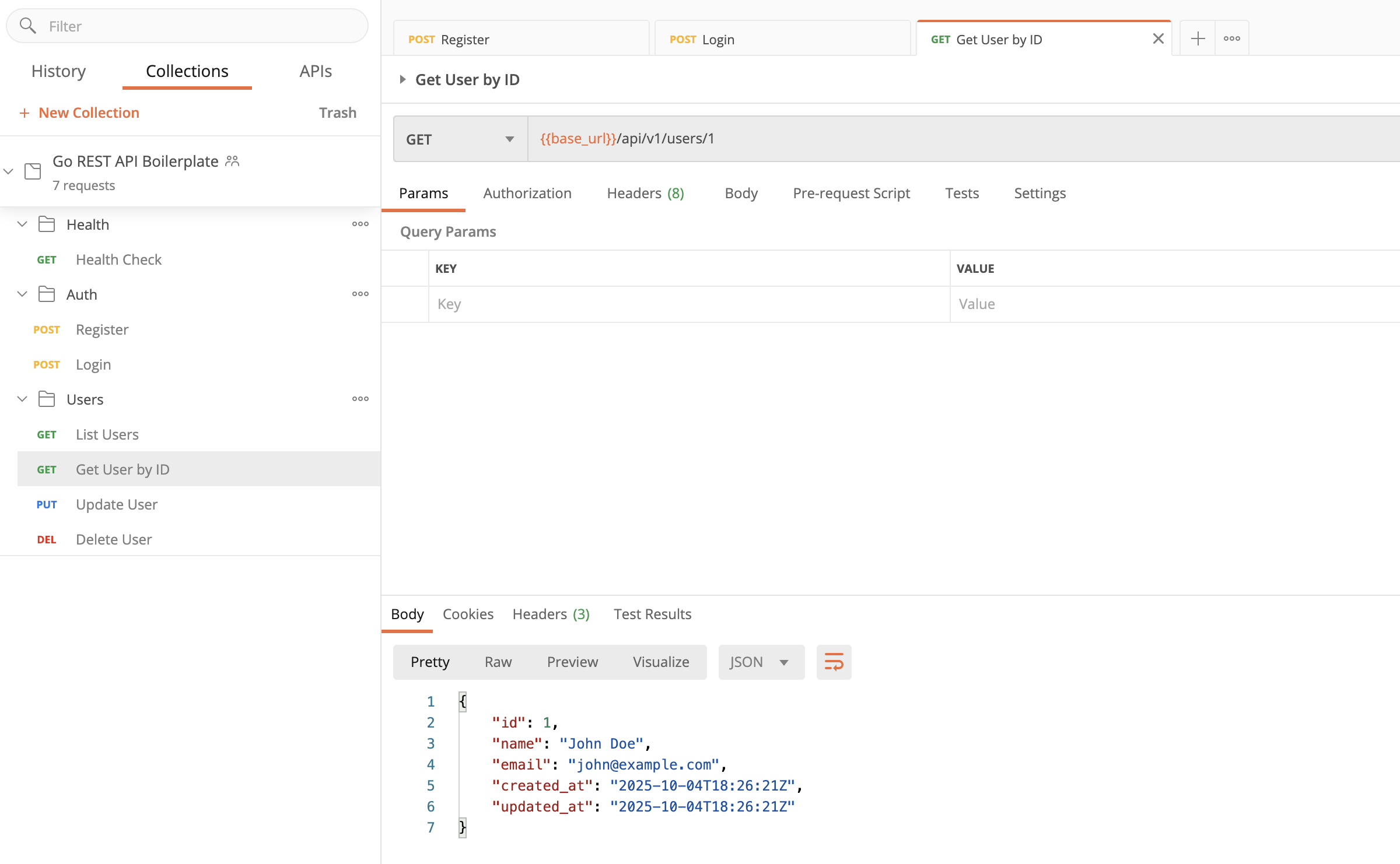
Import the collection:
Features: - ✅ All API endpoints pre-configured - ✅ Environment variables for token management - ✅ Automated tests for responses - ✅ Example payloads for all requests
curl Examples
Register User
curl -i -X POST http://localhost:8080/api/v1/auth/register \
  -H "Content-Type: application/json" \
  -d '{
    "name": "John Doe",
    "email": "john@example.com",
    "password": "password123"
  }'
Login
curl -i -X POST http://localhost:8080/api/v1/auth/login \
  -H "Content-Type: application/json" \
  -d '{
    "email": "john@example.com",
    "password": "password123"
  }'
Refresh Access Token
REFRESH_TOKEN="your-refresh-token-here"

curl -i -X POST http://localhost:8080/api/v1/auth/refresh \
  -H "Content-Type: application/json" \
  -d "{
    \"refresh_token\": \"$REFRESH_TOKEN\"
  }"
Logout
TOKEN="your-jwt-token-here"

curl -i -X POST http://localhost:8080/api/v1/auth/logout \
  -H "Authorization: Bearer $TOKEN"
Get User by ID
TOKEN="your-jwt-token-here"

curl -i -X GET http://localhost:8080/api/v1/users/1 \
  -H "Authorization: Bearer $TOKEN"
Update User
curl -i -X PUT http://localhost:8080/api/v1/users/1 \
  -H "Authorization: Bearer $TOKEN" \
  -H "Content-Type: application/json" \
  -d '{
    "name": "Jane Doe",
    "email": "jane@example.com"
  }'
Delete User
Health Check Endpoints
# Overall health
curl -i http://localhost:8080/health

# Liveness probe
curl -i http://localhost:8080/health/live

# Readiness probe with checks
curl -i http://localhost:8080/health/ready
🔧 Environment Variables
New Viper-based configuration system with updated variable names:
# Copy template
cp .env.example .env

# Edit values
vim .env

# Required variables (updated names)
APP_ENVIRONMENT=development
DATABASE_HOST=db
DATABASE_PORT=5432
DATABASE_USER=postgres
DATABASE_PASSWORD=postgres
DATABASE_NAME=grab
JWT_SECRET=your-secret-here
JWT_TTLHOURS=24
SERVER_PORT=8080
📝 Variable Changes: - DB_* → DATABASE_* (e.g., DB_HOST → DATABASE_HOST) - PORT → SERVER_PORT - ENV → APP_ENVIRONMENT - JWT_TTL_HOURS → JWT_TTLHOURS
🔗 Complete reference: Configuration Guide
🐛 Troubleshooting
Port Already in Use
# Find process using port 8080
lsof -ti:8080

# Kill process
lsof -ti:8080 | xargs kill -9

# Or use different port (updated variable name)
export SERVER_PORT=8081
Database Connection Failed
# Check if PostgreSQL is running
docker ps | grep postgres

# Check logs
docker logs go_api_db

# Restart database
docker-compose restart db
Tests Failing
# Clean and retry
go clean -testcache
go test ./... -v

# Check specific test
go test ./tests -run TestName -v
Import Errors
Docker Build Issues
📊 Useful One-Liners
# Count lines of Go code
find . -name '*.go' | xargs wc -l

# Find TODO comments
grep -r "TODO" --include="*.go"

# Check test coverage
go test ./... -cover | grep coverage

# Format all Go files
find . -name '*.go' | xargs gofmt -w

# Find unused imports
go list -f '{{.Dir}}' ./... | xargs -I {} goimports -l {}

# Run specific handler test
go test -v -run ^TestRegisterHandler$ ./tests
🔐 JWT Secret Management
Generate Secure JWT Secret
Recommended Method (Using Make):
Auto-Generation (During Setup):
Validate Configuration:
Manual Generation Methods
Using OpenSSL (recommended - generates 64 chars):
Using /dev/urandom:
Using Python:
Using Node.js:
Security Requirements
- ✅ Minimum Length: 32 characters (64+ for production)
- ✅ Cryptographically Random: Use secure generation methods
- ❌ Rejected Patterns: "secret", "password", "test", "dev", "123456", etc.
- ⚠️ Never Commit: JWT secrets must never be in version control
📚 Complete Security Guide: Security Documentation
📦 Installation
# Clone repository
git clone https://github.com/vahiiiid/go-rest-api-boilerplate.git
cd go-rest-api-boilerplate

# Install dependencies
go mod download

# Install dev tools
make install-tools

# Or manually
go install github.com/swaggo/swag/cmd/swag@latest
go install github.com/golangci/golangci-lint/cmd/golangci-lint@latest
🎨 VS Code Settings
{
  "go.useLanguageServer": true,
  "go.lintTool": "golangci-lint",
  "go.lintOnSave": "workspace",
  "editor.formatOnSave": true,
  "[go]": {
    "editor.defaultFormatter": "golang.go"
  }
}
🚢 Deployment
Build for Production
# Build optimized binary
CGO_ENABLED=0 GOOS=linux go build -a -installsuffix cgo -ldflags="-w -s" -o bin/server ./cmd/server

# Build Docker image
docker build -t go-rest-api-boilerplate:v1.1.0 .

# Run container (with updated environment variables)
docker run -p 8080:8080 --env-file .env go-rest-api-boilerplate:v1.1.0
Deploy to Cloud
# Tag and push to registry
docker tag go-rest-api-boilerplate:v1.1.0 your-registry/go-rest-api-boilerplate:v1.1.0
docker push your-registry/go-rest-api-boilerplate:v1.1.0

# Pull and run on server (ensure .env has updated variable names)
docker pull your-registry/go-rest-api-boilerplate:v1.1.0
docker run -d -p 8080:8080 --env-file .env your-registry/go-rest-api-boilerplate:v1.1.0
📚 Documentation URLs
| Resource | URL |
|---|---|
| Health Check (Overall) | http://localhost:8080/health |
| Health Check (Liveness) | http://localhost:8080/health/live |
| Health Check (Readiness) | http://localhost:8080/health/ready |
| Swagger UI | http://localhost:8080/swagger/index.html |
| API Base | http://localhost:8080/api/v1 |
🔗 Helpful Links
Quick Help: Run make verify (or ./scripts/verify-setup.sh) to check if everything is configured correctly!
🔧 Helper Scripts
All helper scripts can be run directly or via make commands:
# Install Tools - install all development tools
./scripts/install-tools.sh   # or: make install-tools

# Quick start - automated setup (installs, verifies, starts)
./scripts/quick-start.sh     # or: make quick-start

# Verify - comprehensive setup check
./scripts/verify-setup.sh    # or: make verify

# Init Swagger - generate API docs
./scripts/init-swagger.sh    # or: make swag
What Each Script Does
install-tools.sh - Installs swag (Swagger generator) - Installs golangci-lint (Go linter) - Installs migrate (database migrations) - Installs air (hot-reload for development) - Checks if GOBIN is in PATH
quick-start.sh - Runs install-tools.sh - Runs verify-setup.sh - Creates .env file - Generates Swagger docs - Starts Docker containers - Shows access points
verify-setup.sh - Checks Go installation - Checks Docker installation - Verifies all dev tools installed - Checks project files exist - Validates Go code compiles - Runs all tests
init-swagger.sh - Checks for swag installation - Generates Swagger documentation - Creates docs in api/docs/